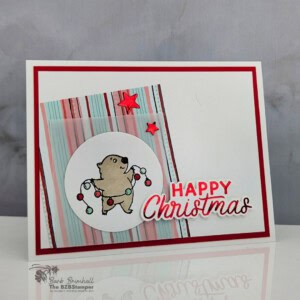
A Playful Christmas Card With Joyful Friends
Add a little mischief to your Christmas cardmaking with the Joyful Friends Stamp Set! This playful card features an adorable critter wrapped in colorful Christmas lights, a shiny red-foil greeting made with the Magical Christmas Hot Foil Dies, and layers of Painted Patch Designer Series Paper and vellum.
Supplies Needed
- Basic White Cardstock: 5-1/2" x 8-1/2" (scored at 4-1/4")
- Poppy Parade Cardstock: 4" x 5-1/4"
- Basic White Cardstock: 3-3/4" x 5"
- Painted Patch Designer Paper: 3" x 3-3/4"
- Very Vellum Cardstock: 2-1/2" x 3"
- Basic White Cardstock: 2-1/2" x 2-1/2" (for circle punch)
- Basic White Cardstock: 4-1/4" x 5-1/2" (for hot foiling)
Instructions
- Fold the Basic White cardstock in half at the score line to create your card base. Decorate the inside of the card as desired.
- Adhere the Painted Patch Designer Paper to the 3-3/4" x 5" Basic White Cardstock at an angle so that it goes off the left edge and bottom of the Basic White Cardstock. See sample for placement.
- Adhere the vellum to the Painted Patch paper as shown on the sample, placing glue in the center only where it will be covered by the punched circle. Using scissors or your paper trimmer, cut off the overhang of the Designer Paper and Vellum so that it's flush with the Basic White cardstock. Adhere to the Poppy Parade cardstock and then to the card front.
- Stamp the critter onto the 2-1/2" scrap of Basic White cardstock using Black ink. Color in using the Stampin' Blends as desired. Punch out the image using the 2" circle punch and adhere onto the vellum so that it covers where the glue is. If desired, add Wink of Stella to the lights.
- Follow the instructions to set up your Hot Foil Machine. (View a video on how to use your Machine here.)
- Cut a piece of Red Foil so that it's a little bit larger than the Magical Christmas Hot Foil die. Heat the Hot Foil die with the flat side down. When ready, place the Hot Foil shiny side down onto the die, then place the Basic White cardstock, then the Green Shim and acrylic plate.
- Unplug the Machine and run the Hot Foil Machine slowly through the Cut & Emboss Machine. Remove the Red Foil liner for the reveal! (My favorite part.)
- Line up the Magical Christmas Cutting dies by lining up the 3 squares in the die. Run through the Cut & Emboss Machine and carefully save all the little pieces.
- Adhere the 2 Red Foil dies to the card front; adhere the sentiment to the card front using Stampin' Dimensionals to finish.
Notes
Worker Bee (for Confident Cardmakers)
Worker Bee projects are designed for the crafter who has a bit more time and enjoys creating a handmade card that features a technique or tool. In this case, there are two tools required: a Stampin’ Cut & Emboss Machine and Stampin' Up!'s Hot Foil System®.
Tried this card?Let us know how it turned out!